
CannonX vs. CannonPro for futures trading
If you trade from a chart and a price ladder, start by testing how CannonX handles one simulated order. If you organize quotes and order history across several desktop windows, look at CannonPro’s configurable workspace. Here’s how to try the tasks you’ll actually use.
Start with the contract and the way you enter orders
Choose a contract and month you recognize. Keep them the same in both platforms so you can compare how quickly you can find the price, open orders and account position. The futures contract directory lists symbols, contract sizes and tick values.
CannonX for charting and depth-of-market trading
CannonX displays prices and trading volume on a chart. Its depth-of-market ladder arranges prices vertically beside order-entry controls. In the demo, move from the chart to the ladder and check the contract month and quantity before entering a simulated order. See CannonX order-entry screens.
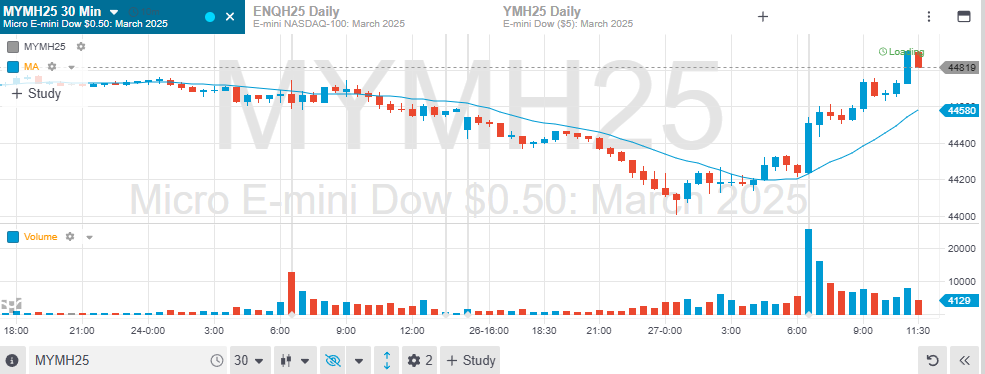
Try the CannonX futures trading platform free for 28 days.
CannonPro for a customizable desktop workspace
CannonPro lets you arrange quotes, charts and news across monitors. Its Trading Matrix and depth-of-market panel sit alongside position summaries and order history. Order-management panels can filter by contract or order status. In a demonstration, ask to see how to isolate one market’s working orders while keeping your total position visible. CannonPro features and demo.
Can you read an order ticket before you send it?
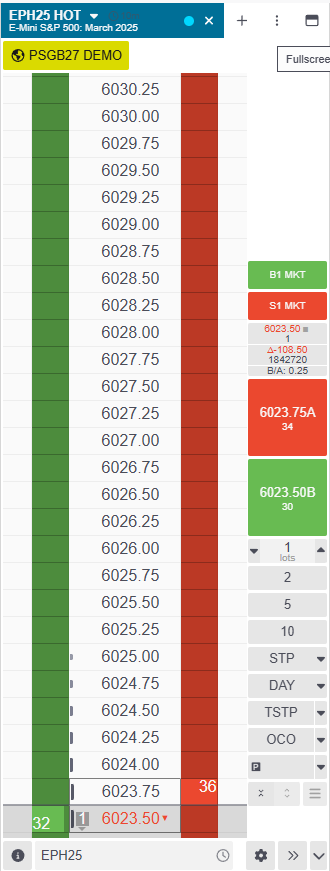
Try this three-part screen test
- Read the contract aloud. The header shows March 2025. In your own demo, find the current contract month and its symbol before you look at the price. A familiar symbol can still point to an old contract.
- Locate the account and quantity. Find the yellow DEMO label and the quantity selector on this example. Then find both on your own screen. Distinguish a one-contract order from the number of contracts already held.
- Trace a simulated order. With a working simulated order, find its status and request a cancellation. Locate the final status. If the order filled first, find the position instead. Record which panel provided the answer.
If you lose your connection mid-test, where would you call? Build a list of trade-desk questions.
Simulated fills can differ from live executions. A limit order may remain unfilled.
Compare your monthly platform and trading costs
For a wider selection, compare futures trading platforms. Use the same contract, exchange data level and monthly volume when pricing both setups. Combine fixed software and data charges with your quoted cost for each entry and exit. Review the E-Futures fee breakdown or estimate your Cannon commissions.

To open an account with E-Futures.com, please click here.
Ready to start trading futures? Call US (800) 454-9572 – Int’l (310) 859-9572 email info@cannontrading.com and speak to one of our experienced, Series-3 licensed futures brokers and start your futures trading journey with E-Futures.com today.
Disclaimer – Trading Futures, Options on Futures, and retail off-exchange foreign currency transactions involves substantial risk of loss and is not suitable for all investors. Past performance is not indicative of future results. You should carefully consider whether trading is suitable for you in light of your circumstances, knowledge, and financial resources. You may lose all or more of your initial investment. Opinions, market data, and recommendations are subject to change at any time.
Important: Trading commodity futures and options involves a substantial risk of loss. The recommendations contained in this writing are of opinion only and do not guarantee any profits. This writing is for educational purposes. Past performances are not necessarily indicative of future results.
**This article has been generated with the help of AI Technology. It has been modified from the original draft for accuracy and compliance.
***@cannontrading on all socials
Put This Into Practice
Choosing a platform? Compare CannonX and CannonPro devices, data and free demos.